# Getting started
HTML: [altophp.com/bezier/getting-started](https://altophp.com/bezier/getting-started/)
A Bézier curve is defined by its control points. The parameter `t` identifies a
position along the curve: `0` is the start and `1` is the end.
After [installation](https://altophp.com/bezier/installation.md), save this script as `curve.php` beside
`vendor/` and run `php curve.php`. It creates a cubic curve, evaluates its
midpoint, measures its approximate length, and splits it into two curves:
```php
pointAt(0.5);
$length = $curve->length(samples: 200);
[$left, $right] = $curve->split(0.5);
echo "Midpoint: {$midpoint}".PHP_EOL;
echo 'Approximate length: '.round($length, 2).PHP_EOL;
echo 'Split joins at: '.$left->pointAt(1).PHP_EOL;
```
The script prints:
```text
Midpoint: (100, 60)
Approximate length: 276.51
Split joins at: (100, 60)
```
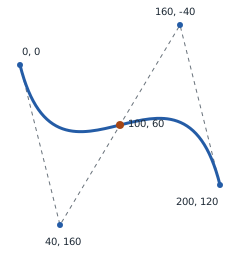
The blue curve uses the example's control points; the dashed polygon joins
those controls. The orange point is `pointAt(0.5)`, not the halfway distance.
The split curves meet at the original midpoint. Increasing the sample count
improves the numerical length approximation at the cost of more work.
Next, [choose a curve type](https://altophp.com/bezier/curves.md) or explore the [operations shared
by every curve](https://altophp.com/bezier/operations.md).
---
Previous: [Installation](https://altophp.com/bezier/installation.md)
Next: [Curves](https://altophp.com/bezier/curves.md)
---
ALTO\BEZIER: [altophp.com/bezier](https://altophp.com/bezier/)
ALTO(PHP): [altophp.com](https://altophp.com/)