Outlines
Read an outline when you draw glyphs yourself, in SVG, on a canvas, or in a
PDF, or when you need a tight bounding box. glyphOutline() returns the
contour geometry of one glyph as neutral path commands in design units;
drawing it is left to your code.
Read an outline
Start from a glyph identifier, here the one of o:
<?php

$glyphId = $font->glyphMetrics('o')->glyphId;
$outline = $font->glyphOutline($glyphId);

if ($outline->isEmpty()) {
    // Spaces and other non-drawing glyphs have no contours.
}

foreach ($outline->contours as $contour) {
    foreach ($contour->commands as $command) {
        // M, L, Q, or Z with their design-unit coordinates.
    }
}M, L, Q, and Z are move, line, quadratic curve, and close-path
commands, the same vocabulary as an SVG path.
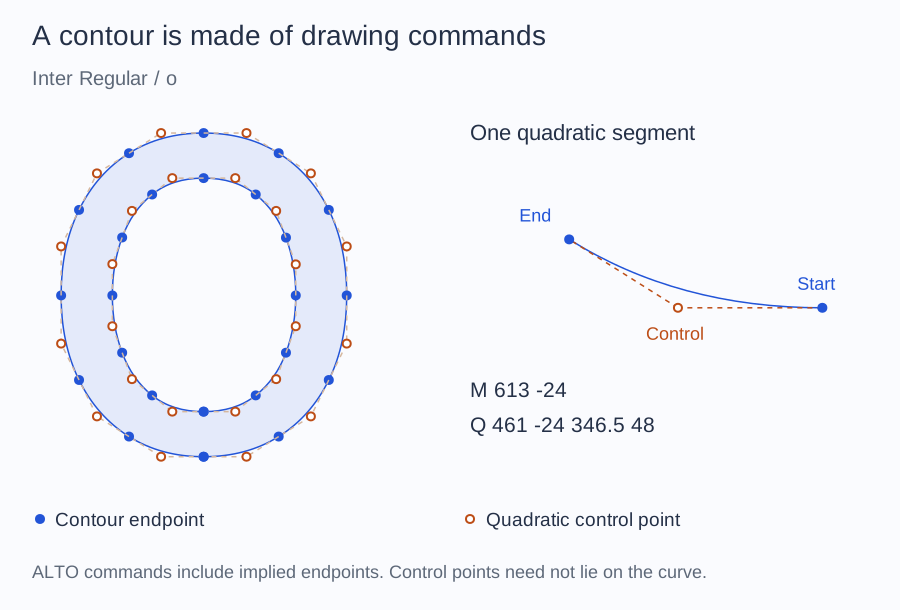
Filled points are contour endpoints; hollow points are quadratic controls.
The enlarged segment is taken directly from glyphOutline(). A control point
need not lie on the curve. ALTO's commands include implied endpoints, so these
markers are not an inventory of the original stored font points.
Transform geometry
Outlines, contours, and path commands accept a two-dimensional affine transform:
<?php

$scale = 16 / $font->face()->unitsPerEm;

$scaled = $outline->transform(
    xx: $scale,
    yx: 0,
    xy: 0,
    yy: -$scale,
    dx: 0,
    dy: 16,
);
The example scales the outline to 16 units, flips the font's upward Y axis, and moves the baseline. It still does not draw the result.
Contract
GlyphOutline exposes glyphId and a list of contours. Each contour
exposes its commands (M, L, Q, or Z). isEmpty(): bool reports
whether there are no contours. transform(float $xx, float $yx, float $xy, float $yy, float $dx, float $dy): GlyphOutline returns a new
affine-transformed outline. Unsupported outline structures raise
UnsupportedFontException; only TrueType glyf outlines are read, see
Tables.